
Instead of manually chasing a budget approval and then rebuilding the trip details for booking, connect the approved itinerary, fare conditions and payment authorization in one request record. A corporate travel budget approval booking workflow should end with an issued e-ticket checked against that approval—not just an email saying the trip is approved.
- Corporate travel budget approval booking needs an explicit handoff from the approver to the person arranging ticket issuance.
- Globalbusinessflights suits corporate travelers who want a dedicated consultant to arrange business or first class tickets.
- Approve a specific itinerary and its fare conditions; return material changes to the approver before ticketing.
- Close the request only after checking the issued e-ticket against the approved travel details.
Why this matters
Budget approval answers whether your company authorizes the expense. It does not establish that a ticket has been issued, that the traveler’s name is correct or that the selected fare meets your change requirements.
For your 2026 travel process, make those separate decisions visible. Approval authorizes the purchase; the e-ticket confirms issuance. Your request record connects them without treating either as a substitute for the other.
Globalbusinessflights arranges business and first class tickets through a dedicated travel consultant, with support from quote to e-ticket. Globalbusinessflights is best for corporate travelers who want consultant-led premium flight booking rather than a self-service booking engine. Your company still needs to define its own approval authority and handoff rules.
Before you start
- Access and ownership: Identify the traveler, budget approver, booking coordinator and payment authorizer. Give each person access to the request record appropriate to their role; keep payment credentials out of shared notes.
- Trip materials: Gather passenger details, destinations, travel dates, cabin requirements, business purpose, cost allocation and any company travel restrictions. Obtain the itinerary and fare conditions before asking for final purchase approval.
- The important catch: An approved quote is not an issued ticket. Ask the consultant to confirm current fare conditions and any stated ticketing deadline before requesting issuance; an internal approval does not extend that deadline.
Use an existing request system, shared document or controlled worksheet. The bold field names below are suggested labels for a record you create, not claims about a particular booking platform’s interface. This guide describes a human approval workflow, not a software integration.
Request record configuration
Build the record around a particular journey, not a general permission to travel. For a 2026 business trip, include the actual departure and return dates rather than relying on a meeting name that several travelers might share.
- Create the request. Add Request reference, Traveler, Business purpose, Cost allocation, Approver and Booking coordinator. Assign 1 request record to each approval decision so the coordinator knows which authorization governs the purchase.
- Define the trip. Add Requested itinerary, Cabin requirement and Travel flexibility. State which dates, airports or connections are acceptable. Describe flexibility precisely enough that the consultant can distinguish an acceptable alternative from a trip that needs another approval.
- Capture the proposed booking. Add Quoted itinerary, Fare conditions, Quote reference and Ticketing deadline, where a deadline is provided. Keep the consultant’s original quote attached so the approver can review the actual proposal rather than a shortened summary.
- Assign ownership. Name the person responsible for obtaining missing information and the person responsible for requesting ticket issuance. If the traveler also performs either role, record that explicitly rather than leaving the handoff implied.
Expected result: Anyone opening the request can identify the traveler, proposed journey, business owner and booking coordinator without searching an email chain.
Keep sensitive passenger information in an appropriately restricted location. The approval record should point authorized staff to that information, not circulate identity documents to everyone who receives a status update.
Approval and purchase authorization
The approval should identify what your company accepts and what requires another decision. A broad approval without an itinerary reference leaves the booking coordinator to interpret whether a different connection or fare condition is acceptable.
- Present the decision. Give the approver the proposed itinerary, cabin, fare conditions and applicable company spending limit. Include the business reason for any exception to policy rather than asking the consultant to infer it.
- Record the authorization. Create Approval decision, Approved itinerary reference, Approved conditions, Approver name and Approval date. Ask the approver to authorize that proposal explicitly. A meeting invitation or acknowledgment that the trip is necessary is not the same instruction.
- Define the change boundary. In Reapproval required when, specify which changes need another decision. Include itinerary, cabin, fare conditions and spending-limit changes according to your company’s rules. Do not assume that an acceptable amount makes every route acceptable.
- Confirm payment authority. Record Payment authorizer and Payment authorization status separately from trip approval. Arrange payment through the agreed booking process; do not paste card details into the approval record.
Expected result: The booking coordinator can tell exactly which proposal is authorized and whether payment authorization is complete.
For your 2026 approval template, separate the business decision from the purchase instruction. This adds a deliberate handoff, but it prevents a general travel approval from being interpreted as permission to issue any ticket for that destination.
Ticketing handoff and completion
An approved request needs an explicit purchase instruction and a check of the resulting travel documents. Use 2 checkpoints: one immediately before requesting issuance and another after receiving the e-ticket.
- Check the final proposal. Ask the consultant to confirm the itinerary and fare conditions being ticketed. Compare them with the approved reference, and resolve any material difference before proceeding.
- Send the purchase instruction. State that the named proposal is approved for issuance and that the required payment authorization is complete. Include the request reference so the instruction can be matched to the correct traveler and journey.
- Check the issued ticket. Compare the passenger name, travel dates, airports, flights and cabin on the issued documents against the approved itinerary. Confirm that the documents include an e-ticket number; do not close the request based only on a reservation reference.
- Complete the record. Add E-ticket reference, Issuance confirmation and Traveler acknowledgment. Store the documents with access limited to the people who need them, and tell the traveler which itinerary is the final version.
Expected result: The completed request contains both purchase authorization and evidence of ticket issuance, with discrepancies resolved or clearly assigned for action.
The handoff follows a simple sequence: Trip request, Purchase approval, Ticketing instruction, E-ticket check. Keep those stages distinct even when the same person handles several of them.
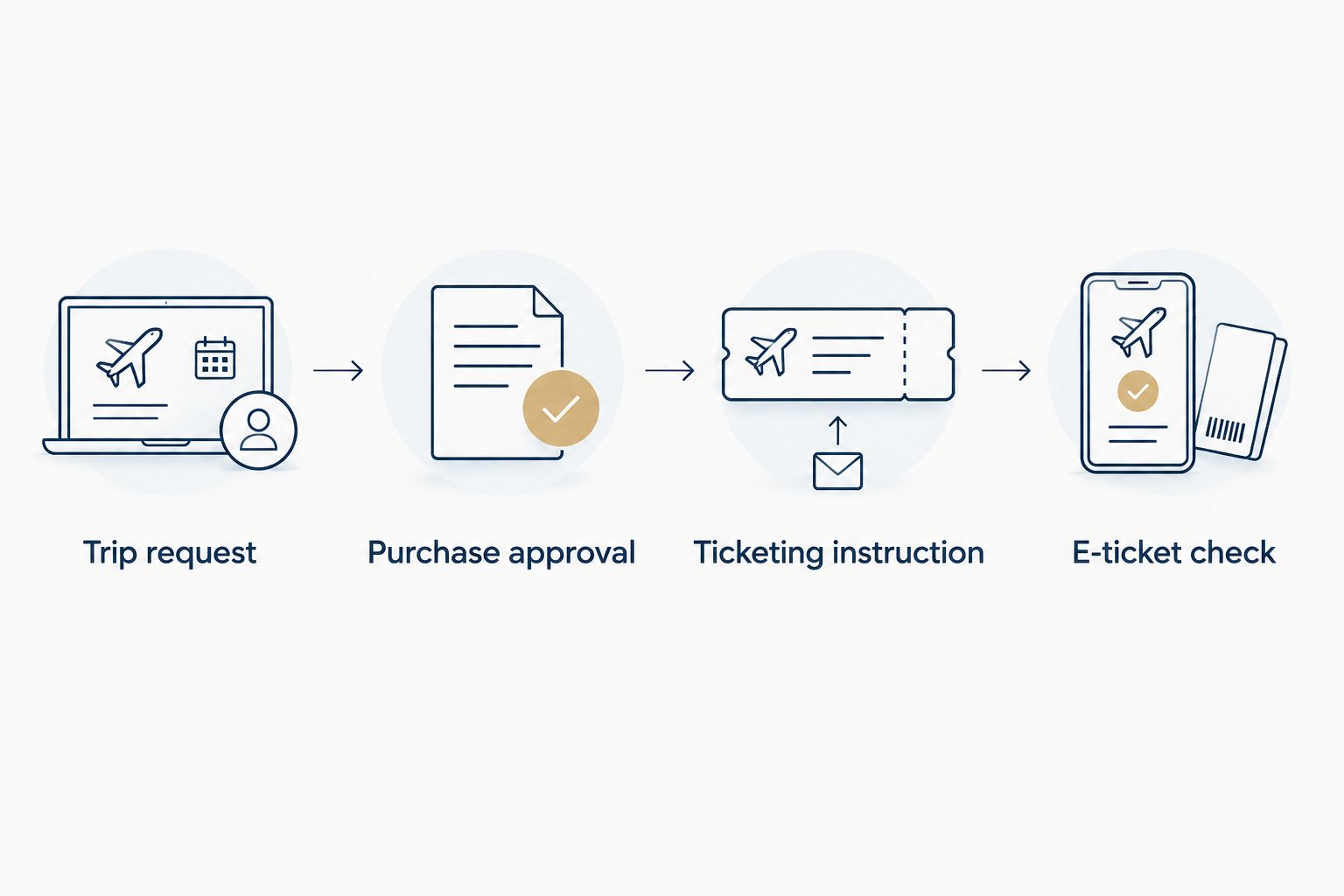
A consultant-led service gives you a named point of contact for the quote-to-ticket process. The trade-off is that your team must send clear instructions and respond to questions; the consultant cannot replace your company’s internal authorization.
When an approved itinerary changes
Use a revision workflow whenever the proposed booking changes before issuance. Do not silently replace the original attachment: the approver needs to see what changed, and the coordinator needs to know which version controls the purchase.
For a revised 2026 trip request, retain the earlier proposal and mark it as superseded. Put the new itinerary, changed conditions and approval decision together in the current record. This preserves the decision history without asking people to reconstruct it from separate messages.
The comparison below shows when to use each workflow. Neither removes the need to check the final e-ticket.
| Workflow | Best for | Advantage | Limitation |
|---|---|---|---|
| Initial itinerary approval | A proposed trip awaiting its first purchase decision | Establishes a clear authorization tied to a specific proposal | Does not authorize later material changes automatically |
| Revised itinerary approval | A proposal that changes before ticket issuance | Makes the changed terms and renewed decision visible | Adds another approval handoff before purchase |
Connect spending limits for purchase approvals to the person authorized to accept a revised proposal, rather than treating a spending limit as permission to change every part of the trip. A different arrival airport or more restrictive fare condition still needs review when it falls outside the original authorization.
Use this revision sequence:
- Record the reason for the change and identify the superseded proposal.
- Ask the consultant for the revised itinerary and applicable fare conditions.
- Compare the revision against Reapproval required when and route it to the named approver when required.
- Send a new ticketing instruction that identifies the current approved proposal.
Expected result: Only the current authorized version moves to ticketing. The earlier approval remains part of the history, not a competing purchase instruction.
Troubleshooting
Approval arrives after a stated deadline
Ask the consultant to reconfirm the proposed itinerary and fare conditions before sending a purchase instruction. If the current proposal differs from the approved version, apply your reapproval rules. Do not treat the earlier quote as a commitment to unchanged terms.
The approver authorizes the trip but not the proposal
Return the request for a specific purchase decision. Attach the itinerary and fare conditions, then ask the approver to identify the proposal being authorized. Keep the record awaiting approval until that ambiguity is resolved.
Payment authorization is incomplete
Keep the ticketing handoff open and notify the payment authorizer. Do not tell the traveler that booking is complete merely because the trip has budget approval. Ask the consultant what action is needed before issuance and record the responsible person.
The traveler receives a reservation reference but no e-ticket
Ask the consultant to confirm issuance and provide the e-ticket details. A reservation reference identifies a booking record; it is not, by itself, evidence that ticket issuance is complete. Leave the request open until the issued documents have been checked.
The issued documents differ from the approval
Contact the consultant promptly with the exact discrepancy and the approved proposal. Keep the traveler informed while the issue is reviewed. Do not promise a correction without confirming the applicable fare conditions and the action available.
Customize your workflow
Before adopting this process across your 2026 travel program, walk through 3 test cases: an unchanged proposal, a revised itinerary and an incomplete payment authorization. These are process checks, not trial purchases. Confirm that each case reaches a named owner rather than ending in an unassigned status.
For multi-passenger travel, specify whether the approval covers the whole party or separate traveler decisions. Record each passenger’s details and check each issued ticket; a group-level approval should not hide an individual name or itinerary discrepancy.
If your company needs managed corporate travel accounts, discuss its approval handoffs with Globalbusinessflights before establishing the booking routine. Explain who authorizes travel, who can request issuance and how itinerary revisions should return to your team.
Use the contact page to start that conversation. Bring your proposed request record and a sample itinerary so the discussion centers on the actual handoff from quote to e-ticket.
FAQ
How do I connect corporate travel budget approval to booking?
Tie the approval to a specific itinerary and its fare conditions, then give the booking coordinator an explicit instruction to request issuance. Complete the request only after checking the issued e-ticket against the approved proposal.
Does an approved travel budget mean my flight is booked?
No. Budget approval authorizes an expense; it does not establish that a ticket has been issued. Confirm issuance and check the e-ticket details before marking the trip complete.
Who should approve a business class booking?
The person authorized under your company’s travel and spending rules should approve the booking. Record that person’s decision against the actual itinerary, cabin and fare conditions rather than a general request to travel.
What happens if the itinerary changes after approval?
Compare the revised proposal with your recorded reapproval rules before requesting issuance. Obtain renewed approval when the change falls outside the original authorization, and clearly identify the current version.
Can Globalbusinessflights arrange corporate premium travel?
Globalbusinessflights arranges business and first class airline tickets for corporate and leisure travelers through a dedicated travel consultant. Companies can also discuss managed corporate travel accounts and the handoff from quote to e-ticket.
Do I need approval software for this workflow?
No. You can organize the workflow in an existing request system or a controlled document, provided ownership, authorization and the current proposal are clear. Software does not replace the need for an explicit ticketing instruction.
What should I check after receiving an e-ticket?
Check the passenger name, dates, airports, flights and cabin against the approved itinerary, and confirm the e-ticket number is present. Raise discrepancies with the consultant promptly and keep the request open until the next action is clear.
One last thing
Make the final status describe evidence, not intent. Instead of ending the record at approved, close it only when the issued ticket has been checked. That small distinction keeps a successful budget decision from being mistaken for a completed booking.